Using the Stanley Memory Bridge
Last updated: February 16, 2026
What is the Stanley Memory Bridge?
The Stanley Memory Bridge is a one-time onboarding step that helps Stanley understand you faster.
If you’ve been using ChatGPT for a while, it may already have context about your work, projects, goals, and communication style. Stanley doesn’t automatically have that history.
The Memory Bridge allows you to transfer that context into Stanley — so you don’t have to start from scratch.
✳ Why use the Memory Bridge?
Instead of re-explaining:
Who you are
What you’re building
What stage your projects are in
How you like to work
You can generate short summaries from ChatGPT and share them directly with Stanley.
This helps Stanley:
Personalize his tone
Recognize your projects instantly
Tailor ideas to your real goals
Collaborate in your preferred style
⚙ How the Stanley Memory Bridge works
The process is simple:
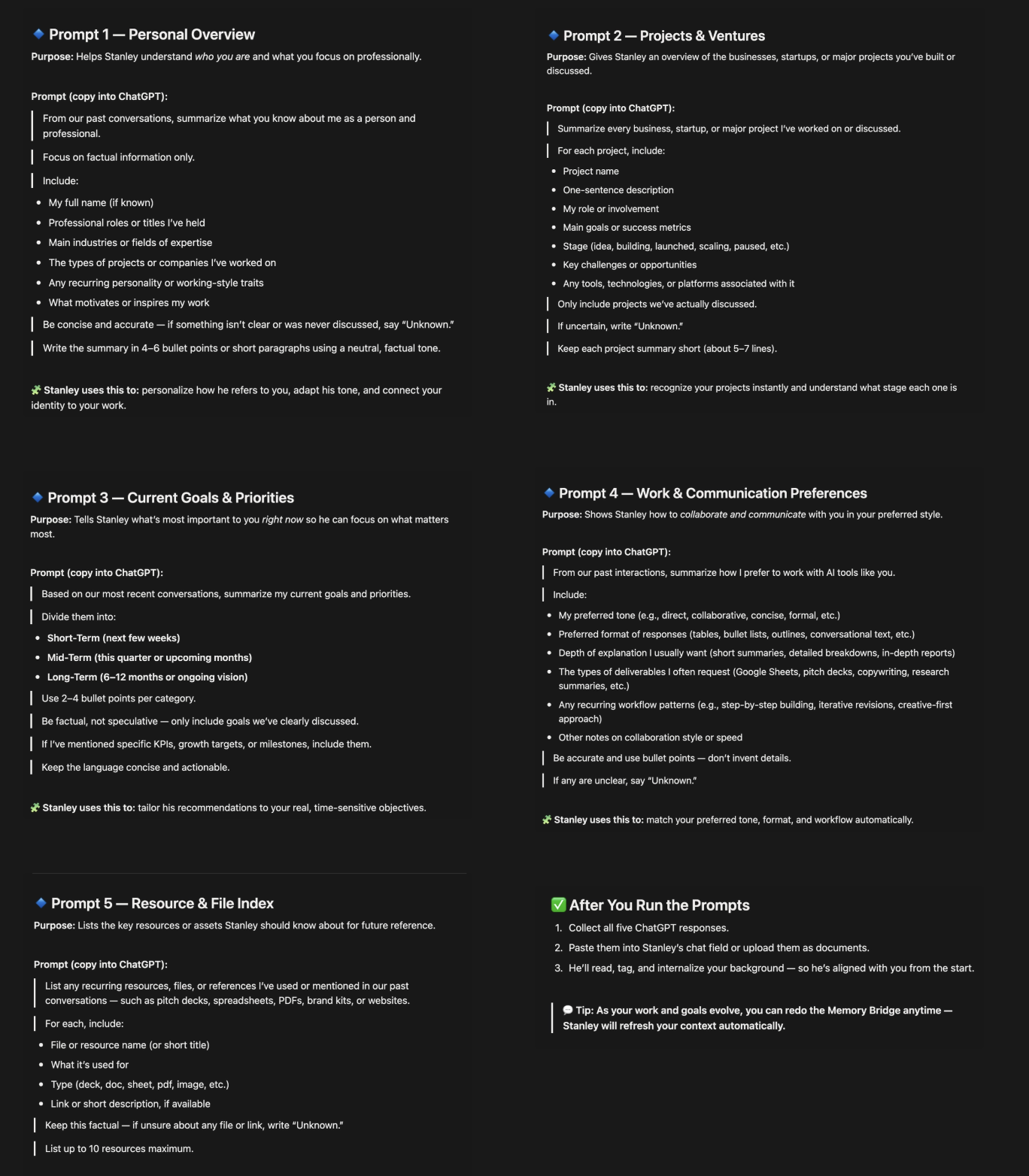
Copy one of the following Memory Bridge prompts.
Paste it into ChatGPT.
Copy ChatGPT’s response.
Paste that response into Stanley’s chat (or upload it as a document).
Repeat for all five prompts.
Stanley will read and internalize the information to improve future responses.
🧠 What information gets transferred?
The Memory Bridge includes five short prompts that summarize:
Personal Overview
Who you are, your professional background, and what motivates your work.Projects & Ventures
Businesses, startups, or major initiatives you’ve discussed.Current Goals & Priorities
Your short-, mid-, and long-term focus areas.Work & Communication Preferences
How you prefer to collaborate, your tone, formatting style, and workflow patterns.Resource & File Index
Key tools, documents, or recurring assets relevant to your work.
Each prompt is designed to use only verified information — if something wasn’t discussed, ChatGPT will say “Unknown.”
🔄 Do I have to do this?
No — the Memory Bridge is optional.
Stanley can still work with you in real time.
The Memory Bridge just speeds up alignment and personalization.
🔁 Can I update it later?
Yes.
As your goals or projects evolve, you can rerun the prompts and paste updated summaries into Stanley at any time.
Stanley will refresh your context automatically.
💡 Pro Tip
If you’ve used ChatGPT extensively for strategy, business planning, content development, or personal growth, the Memory Bridge can dramatically improve how quickly Stanley “gets” you.
🙋 Need help?
If you’re unsure how to run the prompts or where to paste the summaries, email us at stanley@stanwith.me and we’ll walk you through it 💌